Optimizing Space in Two Dimensions
The Challenge
For my first big project, Visual Fraction Library, I was creating models of fraction division with up to 300 circles for users to download as images.
For example here's a model showing 100 divided by 2/5.
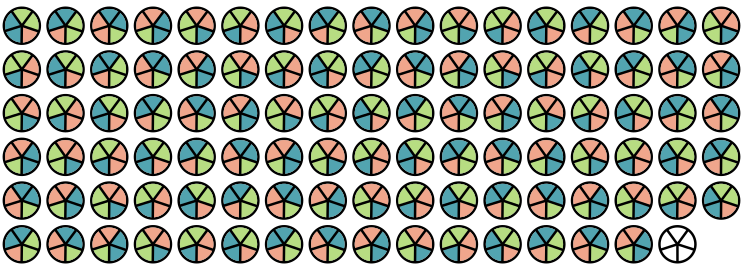
This shows division as dividing 100 into groups of 2/5 where the answer can be found by counting how many groups there are altogether. There are 250 groups of 2/5ths so 100 divided by 2/5 is 250.
The width and height of the images were completely customizable so I needed a way to maximize the available space. I wanted the circles to be as large as I could fit them and spaced evenly. And I wanted to avoid having a row with only one or two circles in favor of adding an extra column if it resulted in less unused space. I needed my function to return the dimensions for the items (in my case the diameter of the circles).
The Solution
My first step was to calculate the number of rows and the number of items per row that I would need. I knew calculating the aspect ratio would be important because the ratio of numRows : itemsPerRow should be equivalent to the aspect ratio of the container. This wouldn't work out perfectly in practice because I'd have decimals if I made it perfectly equivalent, but it was a good starting point. Then I realized if the container was square, I could just use the square root to get the numRows and the itemsPerRow, which should be the same for a square. So I realized I could multiply the number of items by the aspect ratio to make an imaginary square that I could then take the square root of to find the itemsPerRow.
For example, given a rectangle with a width of 900 pixels and a height of 300 pixels, the aspect ratio would be 3 (900 / 300). If we wanted to fit say 100 items in this 900 by 300 container, multiplying 100 by the aspect ratio allows us to consider how to evenly distribute 300 (100*3) items within a 900 by 900 pixel square.
Now that we have a square, we can take the square root of 300 (triple the number of items we actually need) to determine that we need a little over 17 items to go in each row. In order to avoid overflow in the horizontal direction, I used the Math.floor() method which forces the items per row to be 17.
Since we actually only need 100 items in a 900 by 300 pixel container, and now we know we'll have 17 items per row, we can calculate the number of rows needed with 100 / 17. This results in 5.88, which means we need 6 rows but the last row will not be completely filled. So for the number of rows I used Math.ceil() to ensure all the items would fit in the container.
This actually works whether the aspect ratio is greater than one or less than one. Here's an example where the width is smaller than the height, resulting in an aspect ratio of 1/2 or 0.5.
Again, we can use the square root since we have a square and the number of items per row will be the same as for our rectangle. The square root of 30 is ~5.5, so we'll round down to 5.
60 divided by 5 is 12, so we'll have 12 rows of 5 to fill our original 100px by 200px rectangle with 60 items.
Since the original goal of this function was to calculate the optimal size for each individual item, that's our last step. Now that we have the itemsPerRow and the numRows, this is pretty trivial. We just need to make sure to use the smaller of the sizes when doing width / itemsPerRow and height / numRows to avoid any overflow.
Code
Try toggling the values below to see the algorithm in action
As a former math teacher, this was one of the most fun algorithms I've ever had to write. I really enjoy using visuals to figure out and explain math and it was a whole new challenge creating all of the components and interactives to make this blog. Turns out it's really hard to explain things statically without having a back and forth conversation as a bunch of 6th graders calling out questions.